/
Slack connector for Bitbucket Cloud
Slack connector for Bitbucket Cloud
- J Soft
Owned by J Soft
Last updated: Jul 06, 2017
Thanks for your using Slack connector
Support email : jsoftconnector@gmail.com
Support portal (JSD) : https://jsoftconnector.atlassian.net/servicedesk/customer/portal/1
Features :
- Support multiple slack team
- Dynamic configuration per events
- Custom Slack bot name & avatar
- Custom your slack messages with powerful message builder in advanced tab
How to:
- Login https://bitbucket.org/
- Navigate to a repository
- Click on Slack integration items in left menu bar
- Click on "Add to Slack" on top right

- Setup your trigger events to a channel or update your team messages
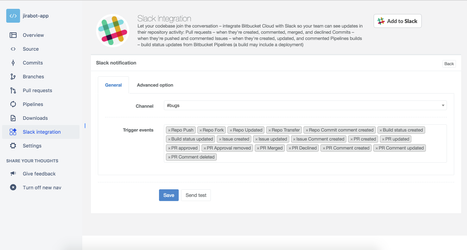
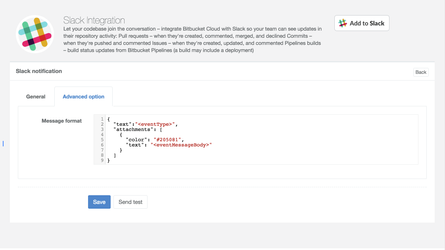
- Send test message
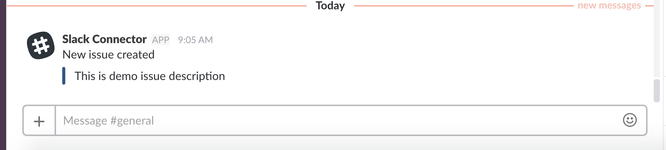
Variables
| Key | Usage |
|---|---|
repository | <repository.fullName> <repository.author.displayName> <repository.links.self.href> |
pullRequest | <pullRequest.title> <pullRequest.description> <pullRequest.reason> <pullRequest.state> <pullRequest.author.displayName> <pullRequest.links.self.href> |
issue | <issue.component> <issue.title> <issue.priority> <issue.state> <issue.type> <issue.created_on> <issue.updated_on> |
commitStatus | <commitStatus.name> <commitStatus.description> <commitStatus.url> |
commit | |
comment | <comment.content.raw> <comment.user.displayName> <comment.user.username> |
actor | <actor.username> <actor.displayName> |
eventType | <eventType> |
Sample message format
| Name | Sample message | Sample Slack notification |
|---|---|---|
| Repo Push | ||
| Repo Fork | ||
| Repo Update | ||
| Repo Transfer | ||
| Repo Commit Comment Created | ||
| Repo Commit Comment Updated | ||
| Build status created | ||
| Build status updated | ||
| Issue created | ||
| Issue updated | ||
| Pull Request created | ||
| PR updated | ||
| PR approved | ||
| PR merged | ||
| PR Declined | ||
| PR Commented | ||
| PR Comment updated | ||
| PR Comment deleted |
Need more , please raise an issue at https://jsoftconnector.atlassian.net/servicedesk/customer/portal/1
, multiple selections available,
Related content
Slack connector for Bitbucket Server
Slack connector for Bitbucket Server
More like this
Slack connector for JIRA Cloud
Slack connector for JIRA Cloud
More like this
Slack connector for Confluence cloud
Slack connector for Confluence cloud
More like this
Slack connector for JIRA server
Slack connector for JIRA server
More like this
Slack connector for Confluence Server
Slack connector for Confluence Server
More like this
Slack Outgoing WebHooks
Slack Outgoing WebHooks
More like this